The Report tool is your command center for fleet analytics, empowering you to turn raw data into actionable insights. With our latest updates, you can organize, filter, and analyze your fleet’s performance more efficiently. Whether you’re optimizing operations, ensuring compliance, or driving sustainability, these new features put the information you need right at your fingertips.
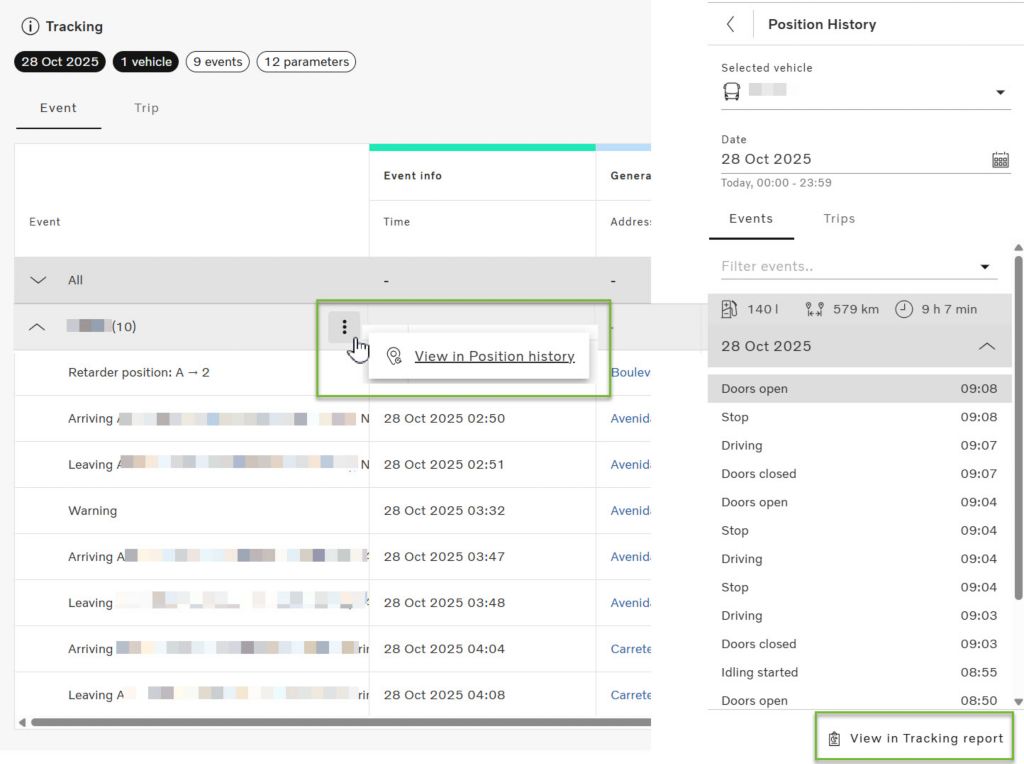
Now you can seamlessly jump between the Map tool’s Position History and the Tracking report in the Reports tool. When viewing events for a vehicle, a direct link lets you switch tools while keeping the same vehicle and time frame selected*. This makes it much easier to analyze data both geographically and in table format, saving you time and reducing the risk of missing important details. Analyzing events from different perspectives will improve your ability to investigate incidents and optimize fleet performance.
* Note that the Tracking report has a default filter for Events. You can use the Filter to select all Events to see more than the default selection.
Vehicle groups are now visible directly in the Tracking report.
You can instantly see which group each vehicle belongs to, both on-screen and in Excel exports. Vehicle groups in Tracking report give you better organization and filtering of your fleet data, making it easier to manage large fleets and generate group-specific reports.
You can now filter standard reports by fuel type.
Only the fuel types present in your fleet will appear in the filter menu, allowing you to include or exclude specific types as needed.
This feature lets you quickly generate targeted reports for compliance, sustainability, or operational analysis, supporting your environmental goals and reporting requirements.
The Administration tool is the backbone of your fleet management system, giving you the power to manage users, assets, and drivers with ease. Our latest improvements enhance transparency and help you ensure your fleet is always up to date so that you can focus on what matters most - growing your business and supporting your team.
Administrators can now export a list of users, including usernames and email addresses, directly to Excel. Simplifies user management, audits, and compliance reporting.
Similarly, administrators can now export their list of drivers, including e-mail address, mobile numbers and USB Driver ID, directly to Excel. This simplifies your driver management and lets you keep track of IDs for reference in external systems.